


Davis's Drug Guide for Nurses
4.8340.00 Reviews
App Specs
- Version
- 6.9.0.561
- Updated On
- License
- Free
- Downloads
- 100,000+
- Developer
- AtmosphereApps
- Categories
- Medical
- Platform
- Android
Screenshots
 Analysis by AppCompare
When I first open a nursing drug reference, I want to know two things quickly: can I find an entry without fuss, and will it help me think through what matters before medication administration? Davis's Drug Guide for Nurses is built around that practical need. It is a medical reference app from AtmosphereApps, and its focus is not simply naming medicines; it is presenting drug information with nursing work in mind. That makes it most useful as a companion for checking and learning, rather than as a substitute for clinical training, facility procedures, or professional judgment.
The app is free to install, rated for Everyone, and has a 4.8 average from around 1.9 thousand ratings. It has more than 100 thousand installs and has been available since 2011. Those details suggest a long-running reference with an established audience, but they do not tell me whether it fits every workflow. My first meaningful test would be much simpler: search for a medication I already know, inspect how the entry is organized, then see whether I can quickly reach the nursing points I need.
First Impressions: Navigating the App
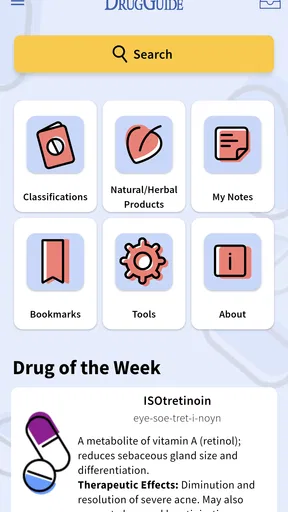
Opening up Davis's Drug Guide for Nurses for the first time feels like stepping into a well-organized library. It's got a clean interface with a straightforward layout that makes it easy to find what you're looking for. The search bar is your best friend here, letting you quickly look up any drug by name. I found it super intuitive—no need to fumble around, which is a lifesaver when you're in a rush.
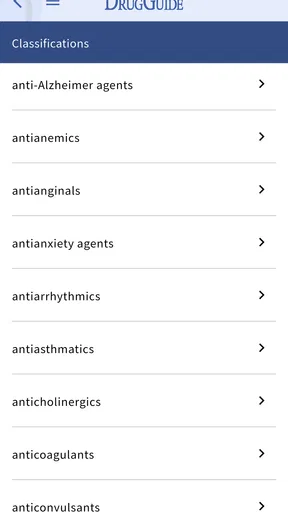
The home screen features quick links to different sections like Drugs A-Z, Drug Classes, and a handy Pill Identifier. I particularly appreciated the "Favorites" section where you can bookmark drugs for easy access later. It’s like having a personalized mini-library right at your fingertips.
A calm first session pays off
For a first-time user, I would begin with a medication that appears often in class or at work rather than trying to explore every section at once. Search the name, read the entry from top to bottom, and notice where the dosage information, adverse effects, and nursing considerations appear. That small orientation step makes a later lookup more purposeful: you already know how the reference presents information, so you are less likely to skim past a section that matters.
Favorites are most useful when treated as a short working shelf, not a substitute for searching. I would save medicines that recur in a current course, placement, or clinical area, then revisit them for study. The trade-off is that a saved item can make a familiar drug feel routine; I would still open the full entry when the patient or situation differs from what I remember.
Features That Stand Out
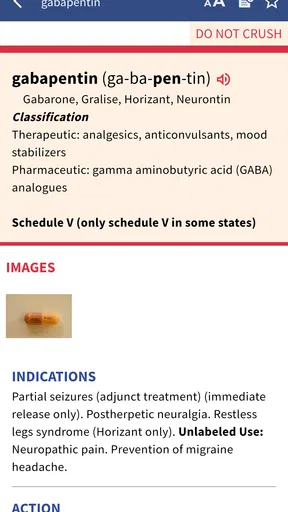
Where do I even begin? The app is packed with features that are designed with nurses in mind. Perhaps the most valuable is the detailed drug monographs. Each entry includes everything from generic and trade names to dosage, side effects, and nursing considerations. It’s like carrying a mini pharmacology course in your pocket.
Worth Reading Before You Choose

EA SPORTS FC Mobile 26 Is a Bigger Football Game, but It Takes Time

Flipboard Shows What News Apps Must Do Beyond the Feed

Switching to Android Auto Means Rethinking Your Driving Routine

Google Calendar Makes a Crowded Week Easier to Manage

Ludo King Makes the Most of the Minutes Between Plans

Baby Panda World Brings Quick Play to Modern Phones, but Its Game Library Feels Busy
One feature I found particularly cool is the "Audio Pronunciations." If you're like me and sometimes struggle with those tongue-twisting drug names, this is a game-changer. Just tap and listen—no more embarrassing mispronunciations in front of patients or colleagues!
- Interactions Checker: This is a lifesaver for preventing adverse drug interactions. Just enter the medications a patient is on, and the app does the rest.
- Calculators: Handy tools for calculating dosages based on weight and other parameters. You won’t need to do math on the fly anymore.
Making the first lookup useful
A drug monograph is easiest to use when I approach it with a specific question rather than reading it as a page of facts. For example, before a class discussion, I might look up a medication to connect its dosage information with its side effects and nursing considerations. That keeps the entry from becoming a memorization list: I can ask what I should monitor, what I need to explain clearly, and what might change the way I approach administration.
The pronunciation tool has a different kind of value. I would use it before teaching a patient or speaking during a handoff, when saying the name clearly can make communication smoother. It is a small feature, but it addresses a real everyday awkwardness that a text-only reference leaves to the user.
The interaction checker and calculators can support a quick review, but I would not treat a result as permission to proceed. A calculator only helps if the values and units entered are correct, and an interaction result still needs to be interpreted in context. I would verify any consequential decision against current clinical guidance and workplace policy, especially when a calculation or combination has patient-safety implications.
In the Trenches: Using the App Daily
In a busy clinical setting, quick access to reliable information is vital. I put the app through its paces during my shifts, and it didn’t disappoint. The speed and accuracy of the search function were impressive, providing me with the info I needed in seconds.
Moreover, I found the "Nursing Considerations" section particularly useful. It offers valuable insights into what I should be aware of while administering medications, from potential side effects to specific patient teaching points. It’s like having a seasoned mentor whispering in your ear.
A realistic routine for students and working nurses
Picture a student preparing for a placement who sees an unfamiliar medication on a care plan. A sensible first pass is to search the drug, identify the relevant monograph, and use the nursing considerations to shape questions for a supervisor. The app can help the student arrive better prepared, but it cannot establish whether a medication is appropriate for a particular patient or replace instructions from the supervising clinician.
For a working nurse, the same reference can be useful between tasks when there is time to confirm a detail or refresh memory. I would avoid trying to read an entire entry while distracted or in the middle of an urgent situation. Instead, I would use it as one part of a deliberate check: pause, find the relevant information, compare it with the medication order and local process, and ask for clarification when something does not fit.
This is where the app’s nursing orientation matters more than a generic web search. A broad search can surface scattered explanations, advertisements, or pages written for a different audience. A dedicated drug guide gives the reader a more focused path through drug information. On the other hand, a facility’s approved electronic record or local medication policy may be the better source for patient-specific instructions and current workflow requirements. I see the guide as complementary, not competing with those tools.
Offline Access: A Real Asset
One of the standout features is the ability to download content for offline access. This is a big deal because not all healthcare facilities have reliable Wi-Fi, and you definitely don’t want to be caught without access to crucial drug information. Download what you need beforehand, and you’re good to go even in dead zones.
Planning around offline use
Offline access is most helpful when I prepare before leaving a dependable connection. I would check that the material I expect to need is available on the device, rather than assuming I can download it later in a basement, on a ward, or during travel. This is a practical habit, not a guarantee that every workflow will be available without a connection; I would test the app in advance and keep a suitable backup reference for situations where access matters.
There is also a useful distinction between having a reference nearby and having the right answer for a specific patient. Offline material can save time when a network is unreliable, but it does not replace local protocols, updated orders, or consultation with a pharmacist or prescriber. For a learner, that boundary is reassuring: the app can support preparation and checking without asking the user to make decisions beyond their role.
Who will get the most from it
I would recommend this guide most readily to nursing students who want a structured way to study medications, and to nurses who value a dedicated reference for reviewing drug details and nursing considerations. It may also suit someone who wants to practice recognizing generic and trade names or become more comfortable pronouncing unfamiliar medicines. The combination of monographs, favorites, audio, and practical tools gives different kinds of learners a few ways into the same subject.
It is less suitable as a first or only source for someone who needs patient-specific prescribing advice, a complete medication administration system, or a replacement for formal instruction. A person looking for a general symptom checker may be better served by a different kind of medical app, while someone whose workplace requires a particular institutional reference should use that approved source first. I would also not choose this app on the assumption that a convenient calculator or interaction check removes the need to confirm inputs and interpret results.
Access, cost, and practical trade-offs
The app is free, while in-app purchases range from $0.99 to $38.99 per item. I would check what is available in the version I plan to use before relying on a specific resource, and decide whether the included access suits my needs. That matters particularly for a student on a budget: it is sensible to try the basic experience and confirm that the reference fits your study habits before paying for anything additional.
The current version is 6.9.0.561 and the minimum operating system is 8.0. Those are useful compatibility details to check before installation, especially if you use an older device. The app’s Everyone age rating does not mean its clinical content is intended to guide children or that it replaces adult supervision; it describes the app’s rating, not the level of expertise needed to interpret medication information.
One trade-off with any compact drug guide is that convenience can encourage quick glances when a careful read is needed. I would use search to get to the right entry, but then slow down enough to check the surrounding context rather than relying on a single number or isolated warning. If the result raises a question, that is a cue to consult an appropriate professional or authoritative workplace resource—not a reason to guess.
Final Thoughts: Worth the Investment?
So, is Davis's Drug Guide for Nurses worth downloading? Absolutely. It’s a comprehensive, user-friendly app that’s designed to meet the specific needs of nurses. The combination of detailed drug information, intuitive navigation, and practical features like interaction checkers and calculators make it a must-have tool for anyone in the nursing profession.
Sure, there’s a subscription fee involved, but think of it as an investment in your practice. The peace of mind that comes with having accurate, reliable drug information at your fingertips is priceless. So, if you're looking for a dependable drug guide to support your nursing journey, this app is definitely worth checking out.
My recommendation after a first look
I would start with one familiar medication, explore its entry, and save it only if I expect to return to it. Then I would try a less familiar name, listen to its pronunciation, and see whether the nursing-focused material answers the sort of question I actually have. That gives a new user a quick, low-pressure way to judge whether the layout and depth suit their routine.
My overall view is positive, with an important limit: a drug reference is strongest when it supports careful practice rather than trying to replace it. For nursing students and nurses who want a focused mobile companion for learning and quick review, this is a worthwhile option to explore. For patient-specific decisions or workplace instructions, I would pair it with the approved clinical resources and the guidance of qualified colleagues.
Pros
- Comprehensive drug database.
- User-friendly interface.
- Regular updates with new drugs.
- Detailed interaction checker.
- Offline access available.
Cons
- Requires in-app purchases.
- Large initial download size.
- Limited customization options.
- Occasional loading delays.
- No dark mode option.
FAQs for Davis's Drug Guide for Nurses
What is Davis's Drug Guide for Nurses?
Davis's Drug Guide for Nurses is a comprehensive mobile application designed to provide detailed drug information, including dosing, side effects, interactions, and more. It is specifically tailored for nurses and healthcare professionals to ensure safe medication administration and patient care. The app is available for both Android and iOS devices.
How often is the drug information updated in the app?
The drug information in Davis's Drug Guide for Nurses is frequently updated to ensure accuracy and reflect the latest medical standards and practices. Updates are typically managed by a team of experts, ensuring that users have access to the most current and reliable data available.
Is Davis's Drug Guide for Nurses free to use?
While the app may offer a free version with limited features, full access to all content and updates typically requires a subscription. This model ensures users receive the most comprehensive and up-to-date information. Check the app store for the latest pricing and subscription details.
Can I use Davis's Drug Guide for Nurses offline?
Yes, one of the key features of Davis's Drug Guide for Nurses is its offline accessibility. Once downloaded, users can access drug information without an internet connection, making it a reliable resource in settings with limited connectivity, such as remote areas or during travel.
What are the main features of Davis's Drug Guide for Nurses?
The app includes detailed drug monographs, dosing calculators, patient safety tips, and drug interaction checkers. It also provides nursing considerations to help ensure safe practice. The user-friendly interface and search functionality enhance its usability, making it a vital tool for healthcare professionals.


